Blogs>> 2021 >> Building Large Scale C/C++ Projects
Building Large Scale C/C++ Projects
1. General building process
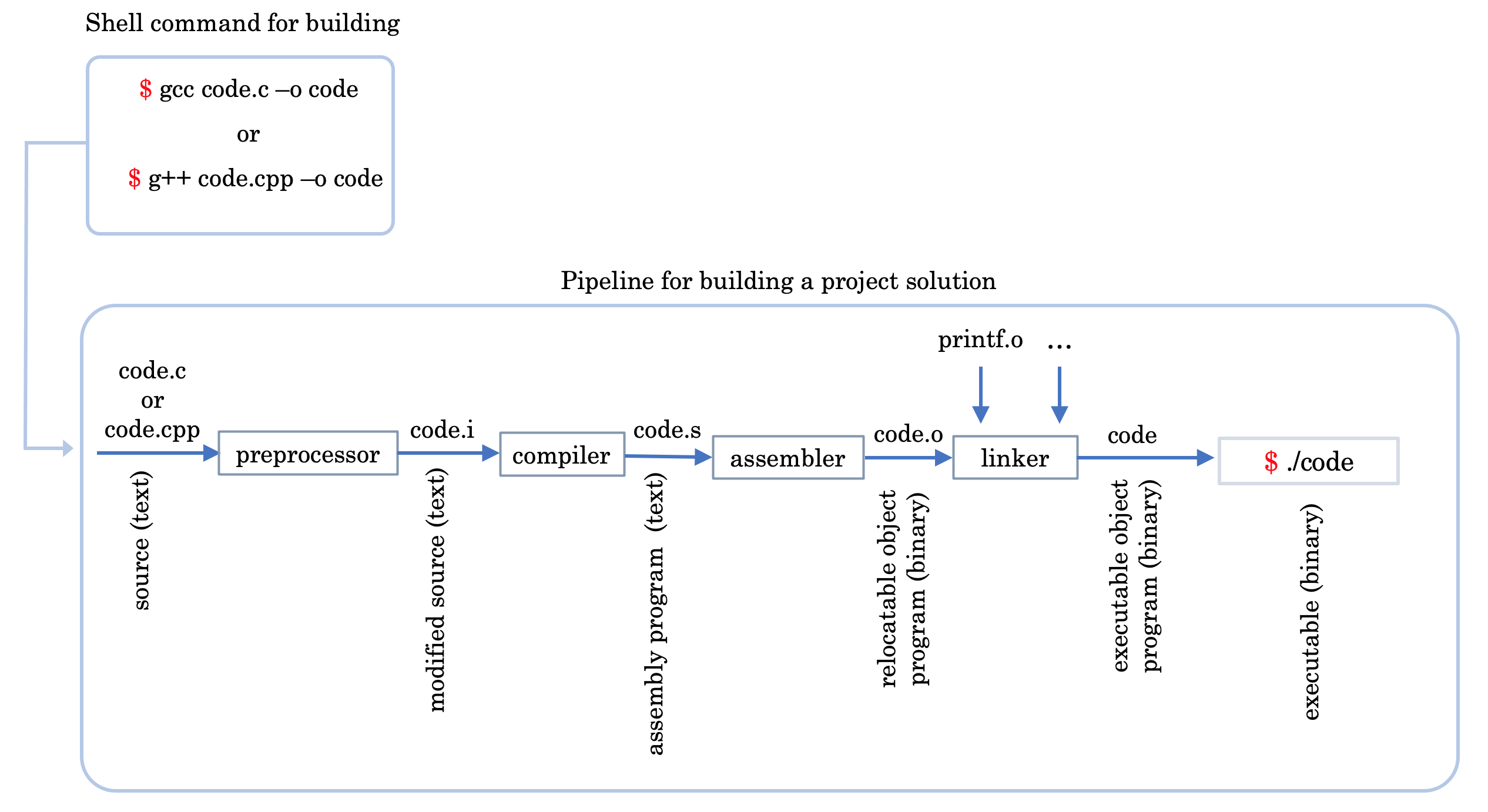
The general building process can be divided into two tasks: compilation and linking. On
Linux, the compiler translates each source file into a relocatable object file, which holds
machine code but does not yet know where the functions it calls actually live. The linker
then resolves those references across all the object files and the libraries, and writes
out a single executable. The following figure depicts the whole principle.
Fig. 1 Compilation of object modules and linking the objects to build the
executable of a source code hw.c or hw.cpp. The name hw is a short form of the legendary hello
world terminology. (image modified from
Computer Systems: A Programmer's Perspective by Randal E. Bryant, David R. O'
Hallaron)
Compilation command of a simple source file:
$ g++ -o hw hw.cpp
$ ./hw
The -o flag names the output, so this produces an executable
called hw, which you then run as
./hw. The elements of the compilation pipeline have the
following roles:
Preprocessor: modifies the original program according to directives that begin with the '#' character, such as #include and #define.
Compiler: translates the preprocessed source into assembly language.
Assembler: translates the assembly into machine code, producing a relocatable object file. This is not yet a runnable program.
Linker: merges those object files with the library code they depend on, such as printf.o, and produces the final executable.
2. Handling the header files
So what's the difference between header-files and source-files?
A source file is a translation unit: the compiler is pointed at it directly and
produces one object file from it. A header file is never compiled on its own — it is
textually pasted into every source file that #includes
it, and is compiled as part of each of those. That is why a header should contain
declarations rather than definitions, and why one should never
#include a source file.
C/C++ programs are built in a two stage process. First, each source
file is compiled on its own. The compiler generates intermediate
files for each compiled source file. These intermediate files are
often called object files -- but they are not to be confused with
objects in your code. Once all the files have been individually
compiled, the system then links all the object files together,
which generates the final binary (the program).
This means that each source file is compiled separately from other
source files.
Inputs: plusvec.h, plusvec.cpp,
minusvec.h, minusvec.cpp,
and algebra.cpp which holds main().
This works, but it does not scale. A much better solution is to compile the project in parts:
create the object files, .o, separately, and only then link
them together into the final executable. The preferred approach is documented below:
Note, each of the three commands like g++ -c filename.cpp creates the corresponding
object file filename.o. The last command performs the
linking, joining all the .o files to create the executable
compute.
Why is this a better approach? Because say you need to edit the file minusvec.cpp for
some reason. There is then no point in recompiling all of the sources — only
minusvec.cpp has to be turned into a new
minusvec.o, and the existing
plusvec.o and algebra.o
can be reused at the linking step. In this case we just have
three small files, but in real projects the files may number in the hundreds while the contents
of the files may be huge. Recompiling everything every time will take long. Hence compilation in parts is
convenient for large scale projects.
3. Include-guard: including the header files the right way
Suppose we have the following sources. Note that plusvec.h
and minusvec.h both include
getvec.h, and that
algebra.cpp includes both of them.
/* getvec.h */

struct Vec {
    int* data;
    int  d;
};

int* getvec(int d, int initval);
/* plusvec.h */

#include "getvec.h"
int* plusvec(int* x, int* y, int d);
/* minusvec.h */

#include "getvec.h"
int* minusvec(int* x, int* y, int d);
/* getvec.cpp */
#include <cstdlib>
#include "getvec.h"

int* getvec(int d, int initval) {
    int* v = (int*) calloc(d, sizeof(int));
    for(int i = 0; i < d; ++i) v[i] = initval;
    return v;
}
/* plusvec.cpp */
#include "plusvec.h"

int* plusvec(int* x, int* y, int d)
{
    int* res = getvec(d, 0);
    for(int i = 0; i < d; i++)
        res[i] = x[i] + y[i];
    return res;
}
/* minusvec.cpp */
#include "minusvec.h"

int* minusvec(int* x, int* y, int d)
{
    int* res = getvec(d, 0);
    for(int i = 0; i < d; i++)
        res[i] = x[i] - y[i];
    return res;
}
Because algebra.cpp includes both
plusvec.h and minusvec.h,
and each of those includes getvec.h, the preprocessor pastes
the contents of getvec.h into
algebra.cpptwice. The compiler therefore sees
struct Vec defined two times and refuses to continue:
$ g++ -c algebra.cpp
In file included from minusvec.h:3,
                 from algebra.cpp:6:
getvec.h:3:8: error: redefinition of ‘struct Vec’
    3 | struct Vec {
      |        ^~~
It is worth being precise about what does and does not break here. Repeating a function
declaration such as int* getvec(int, int); is
perfectly legal — you can write it a hundred times and the compiler will not complain. What
cannot be repeated is a definition: a struct or class, a typedef, an inline function
with a body, or a variable. Since almost every real header eventually contains one of those,
headers are guarded as a matter of habit rather than only when the error appears.
The fix is the include-guard, and it goes inside the header being protected —
that is, in getvec.h itself, once:
/* plusvec.h */

#ifndef PLUSVEC_H
#define PLUSVEC_H

#include "getvec.h"
int* plusvec(int* x, int* y, int d);

#endif
/* minusvec.h */

#ifndef MINUSVEC_H
#define MINUSVEC_H

#include "getvec.h"
int* minusvec(int* x, int* y, int d);

#endif
The first time the preprocessor reaches getvec.h,
GETVEC_H is not yet defined, so it defines the macro and keeps
the body. The second time — arriving via minusvec.h —
GETVEC_H is already defined, so everything up to the matching
#endif is skipped. The struct is therefore defined exactly once,
and the file compiles.
Note that the guard lives in the header it protects, not at the places that include it. That is
what makes it reliable: getvec.h is now safe no matter who
includes it or how many times, and nobody who includes it has to remember anything. For the same
reason plusvec.h and
minusvec.h are given guards of their own above — every header
you write should have one. The macro name is conventionally derived from the file name so that it
stays unique across the project.
The sources — getvec.cpp,
plusvec.cpp, minusvec.cpp
and algebra.cpp — need no change at all.
4. Automating builds with Makefile
Compilation of big projects involving multiple source-files and their headers is a tedious job. Compiling
them repeatedly especially during debugging is an extra headache. Automation tools help. Makefile is such
a tool that can take much of the load off your head.
Consider one of the previous examples where we compiled the sources into the executable like this:
Let's see how we can use Makefile to build the executable compute. A simple makefile
consists of "rules" with the following shape:
target: prerequisites
	recipe
A target is usually (i) the name of a file that is generated by a program (executable or object files),
or (ii) the name of an action to carry out, such as 'clean'.
A prerequisite is a file (or several files) that is (are) used as input(s)
to create the target.
A recipe is an action that make carries out. A recipe may span several lines, each
holding one command. Every recipe line must begin with a tab character, not spaces — this is
the single most common cause of the error missing separator.
The following simple makefile illustrates one of our build processes mentioned above.
Our Makefile has a target 'all' with a prerequisite but no recipe, a target
'compute' with both prerequisites and a recipe, and a target 'clean' with a recipe but no
prerequisite. But how does the Makefile work? Read the passage below for details.
The .PHONY line declares that 'all' and 'clean' are action
names, not files to be built. Without it, creating a file called
clean in the directory would make
make clean silently stop working, because make would see the
target as already up to date.
4.i. How make Processes a Makefile?
When you execute the command: $ make, make reads the makefile in
the current directory and proceeds by processing the first target (default target). In the example,
the first target is 'all' which has prerequisite 'compute' as the next target. So the next target
'compute' has prerequisites that are just the source files and hence are available in the current
directory. Then 'compute' starts with the rule that is essentially creating the executable 'compute'.
When you type make clean the 'clean' target is executed.
So far the makefile rebuilds everything whenever anything changes. To get the selective
recompilation described in section 2 — where only the file you edited is compiled again — each
object file needs its own rule, listing the source and the headers it depends on:
Now if any single source is modified, you don't have to recompile everything — only what you
modified. Editing plusvec.cpp and running
make recompiles just
plusvec.o and relinks.
Listing the headers as prerequisites matters more than it looks. If
algebra.o depended only on
algebra.cpp, then editing
getvec.h would leave make with nothing to do — it would report
Nothing to be done for 'all' and quietly leave you with a stale
executable built against the old header.
4.ii. Variables Make Makefiles Simpler
One can also use variables when writing Makefiles. It comes in handy in situations where you want
to change the compiler, or the compiler options. By convention
CXX and CXXFLAGS are used
for C++ (CC and CFLAGS are
the C equivalents).
Building a C++ project of any size comes down to three habits, each of which
we have now seen in turn.
First, compile in parts. Turning each source file into its own object file and
linking them at the end costs nothing on a three-file example, but it is what keeps a
thousand-file project from recompiling in full every time you fix a typo.
Second, guard every header. Put the #ifndef /
#define / #endif
pair inside the header itself, so that it is safe no matter who includes it or how often.
A header that protects itself needs nothing from the files that use it.
Third, let make do the bookkeeping. Once the dependencies — sources
and headers — are written down honestly in a Makefile, a single
make rebuilds exactly what changed and nothing else.
None of this is specific to the toy vector example used here. The same three ideas scale
essentially unchanged to real codebases, which is why they are worth getting into your
fingers early.